
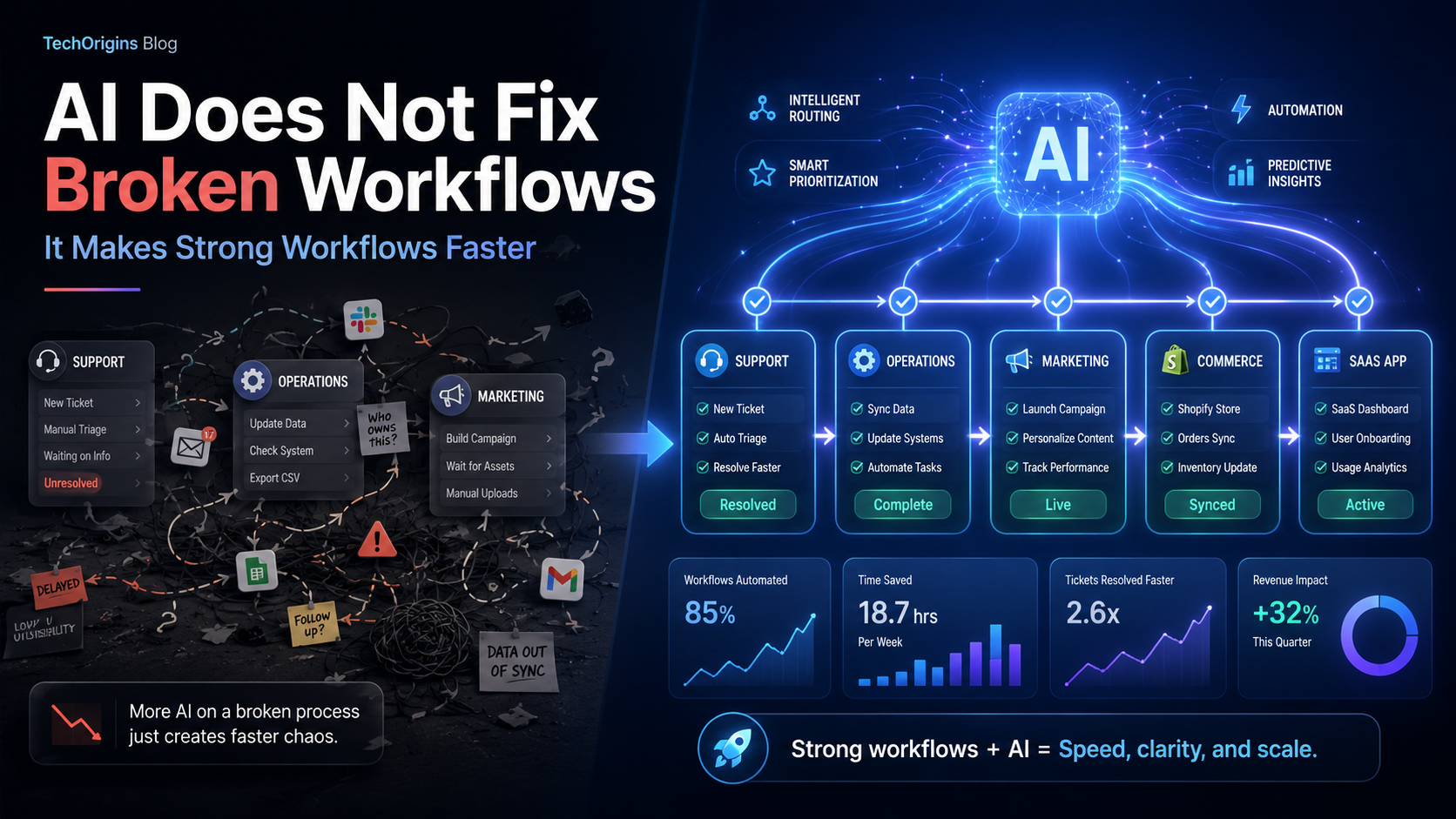
AI Does Not Fix Broken Workflows. It Makes Strong Workflows Faster.
Everyone is talking about AI for support, AI for marketing, AI for operations, and AI for product development. The pitch is often simple: plug in an AI tool and watch productivity soar.
Reality is less glamorous. Across projects at TechOrigins, we see a consistent pattern: AI workflows amplify what already works. If the underlying process is unclear, slow, or political, AI does not fix it. It just helps you reach poor outcomes faster.
This post explains why that happens, how to think about AI productivity in operational and marketing contexts, and a practical framework for deciding where to apply AI first.
Why AI Workflows Succeed Or Fail Comes Down To Process Maturity
Research is unambiguous. AI shines when it accelerates mature, well-defined workflows.
Gartner reported in 2026 that organizations with mature, documented workflows that adopted AI saw a 41% increase in operational throughput on average. In contrast, companies that applied AI to poorly defined processes saw marginal gains at best.
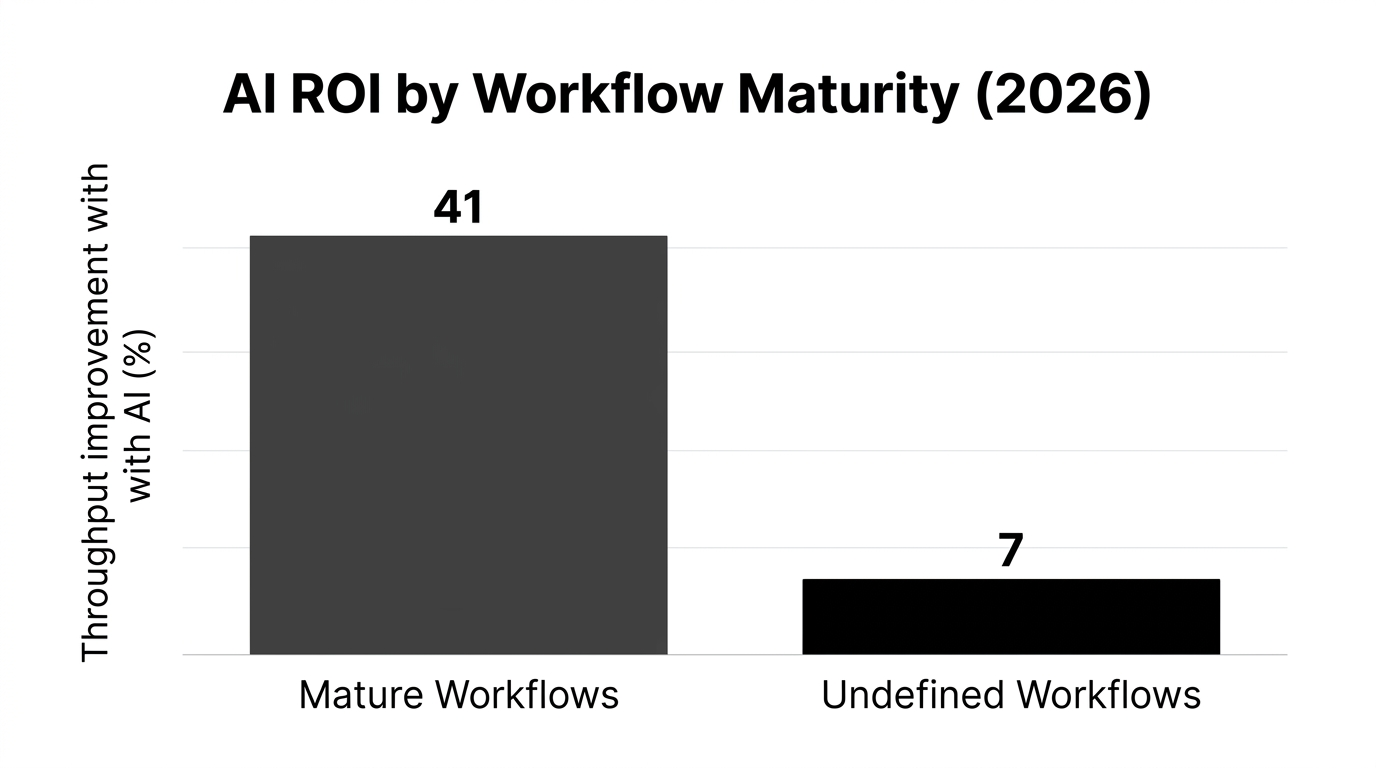
A 2026 study cited by Gartner compared AI ROI across workflow maturity levels:
- Mature workflows: 41% average throughput improvement
- Undefined workflows: only 7% improvement
The pattern is echoed elsewhere:
- IDC found 72% of digital transformation leaders said AI enhanced efficiency in established workflows, but only 17% saw significant gains when AI sat on top of fuzzy processes (2026).
- Deloitte reported a 29% productivity gain when AI was applied to stable processes, and essentially no material improvement where workflows lacked clear definition (2026).
- McKinsey found 34% of companies cited re-engineering business processes as the top success factor before implementing AI tools for productivity (2026).
The message is clear: AI is not a process designer. It is a force multiplier for processes you already understand.
The Speed Multiplier Framework For AI Workflows
At TechOrigins, we use a simple lens with clients: treat AI as a speed multiplier on a process score.
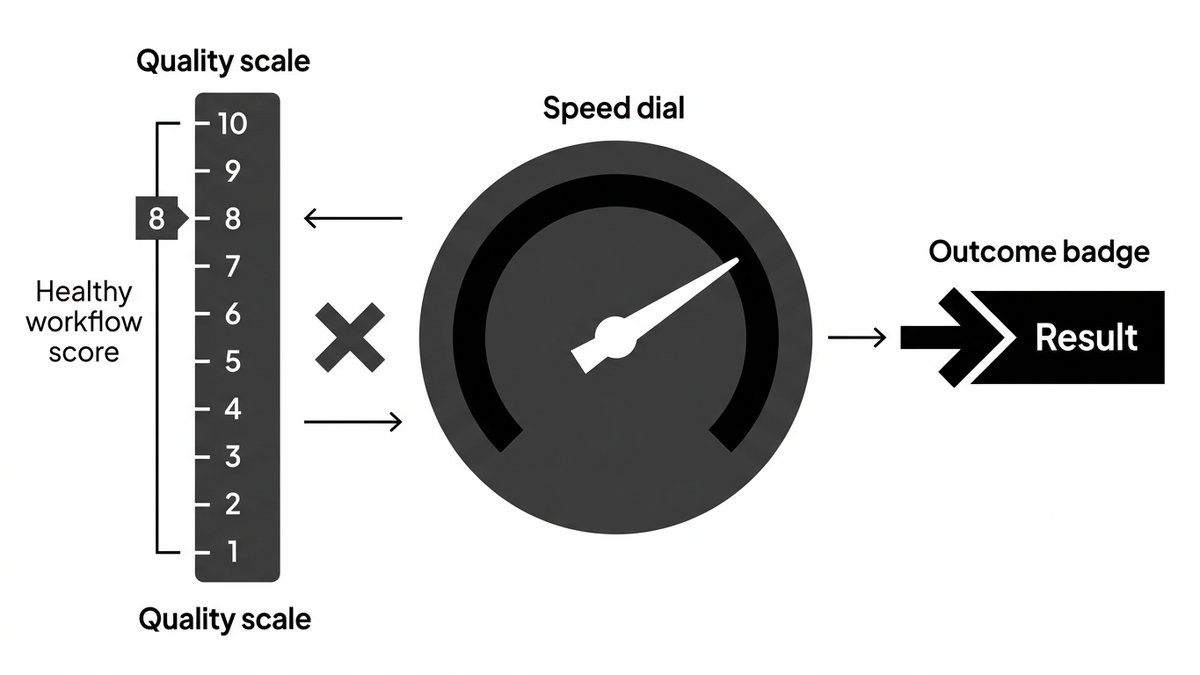
Imagine every workflow in your company has a "health" score from 1 to 10. Then AI acts like a multiplier:
Outcome = Workflow Quality × AI Multiplier
If your customer support workflow scores 8, and AI doubles response speed, you get a strong outcome. If your marketing campaign workflow scores 2, and you drop in a powerful marketing AI stack, you get faster chaos.
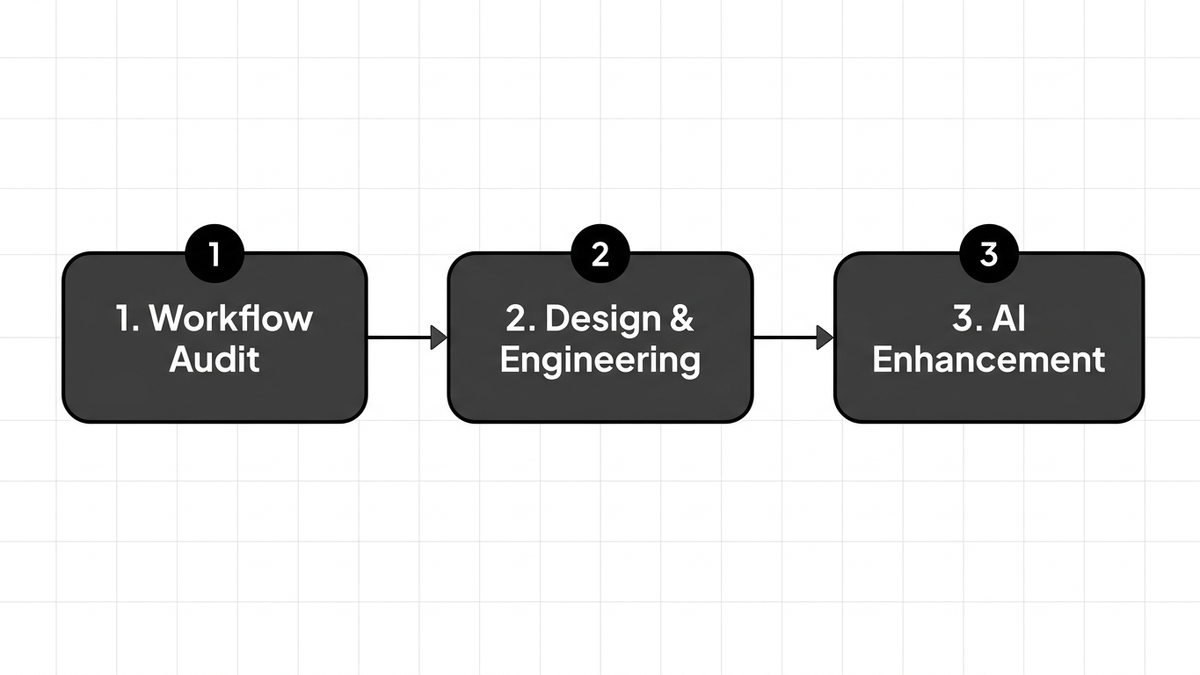
A practical way to operationalize this is a three-step triage:
- Score the workflow on clarity, ownership, and measurability.
- Fix the fundamentals until you reach at least a 6 out of 10.
- Layer AI to accelerate, not to define, the process.
This simple mental model keeps teams from expecting AI to replace basic operational hygiene.
Signs Your Workflow Is Not Ready For AI
Before you deploy AI in operations or AI for marketing campaigns, check for these red flags:
- No single owner for the workflow, or decisions made by committee
- Steps live in people’s heads, not a documented system
- Metrics are vague, such as "do more" or "increase engagement"
- Data sources are inconsistent or dirty
- Work routinely jumps channels (email to chat to spreadsheet) without reason
If more than two of these apply, you do not have an AI problem. You have a workflow design problem.
Where AI Workflows Add Real Productivity: Operations And Marketing
Not every process deserves AI. The best gains come from repetitive, measurable, and data-rich workflows that are already working at a small scale.
AI In Operations: From Stable To Scalable
AI in operations management is especially effective in:
- Ticket triage and routing once categories and SLAs are clearly defined
- Inventory planning where you already trust your demand data and catalog taxonomy
- Exception handling for logistics when there is a known playbook for each scenario
A Forrester study in 2026 reported that 85% of enterprises using AI-powered workflow automation said the main benefit was acceleration of already effective processes, not fixing inefficiency.
Operational AI works like a high-speed conveyor belt. If items coming into the system are labeled, standardized, and quality checked, you can run the belt very fast. If items are random and unlabeled, more speed only increases damage.
AI For Marketing: Precision Over Volume
The same logic applies to AI and marketing. Marketing AI tools do not replace clear positioning, audience insight, or channel strategy.
They can dramatically improve:
- Ad creative testing for already proven offers
- Content personalization when segments and messaging frameworks are well defined
- Email cadence optimization, once you have a working lifecycle sequence
McKinsey’s 2026 research on AI business marketing found that workflow design and clarity of target segments were among the top predictors of ROI from AI advertising and AI for marketing campaigns.
Treat AI for marketing as a precision amplifier, not an idea generator. It will expand what you already know about your customers and channels, not invent it for you.
Case Study: Two Very Different AI Outcomes
To see the contrast, consider two anonymized client scenarios similar to those we encounter at TechOrigins.
Case 1: AI Fails On Top Of A Broken Scheduling Workflow
A mid-sized healthcare provider adopted AI productivity tools to optimize patient appointment scheduling. The idea was to reduce no-shows and increase utilization.
However, the underlying workflow had issues:
- Multiple disconnected booking systems across locations
- Inconsistent data entry practices
- No standard policy on overbooking or cancellation windows
AI was configured to suggest optimal time slots and overbooking rules. The result: no significant change in show rates or utilization. Staff distrusted the recommendations because they contradicted local practices. AI simply automated confusion.
When the organization later standardized the scheduling process, consolidated booking into a single source of truth, and enforced clear policies, a reintroduced AI model achieved a 31% drop in no-shows within months, as reported by a 2026 Forrester analysis.
Case 2: AI Accelerates A Mature E-commerce Workflow
A DTC retailer with a strong Shopify-based storefront partnered with a senior team like TechOrigins to scale without sacrificing customer experience.
Their conversion funnel was already healthy:
- Clear ICP and segmentation
- Battle-tested landing page templates
- Structured onboarding flow via product quizzes
TechOrigins-style enhancements layered AI in three places:
- AI product quiz logic that refined recommendations in real time based on user answers and behavior.
- AI-driven merchandising that adjusted collections based on sell-through and margin targets.
- AI-powered support that suggested responses drawn from a well-maintained knowledge base.
Because the workflows were mature and data was clean, AI produced immediate, measurable outcomes:
- Faster quiz completion and higher add-to-cart rates
- Reduced manual merchandising workload
- Shorter first-response time in support, without loss of quality
This is the pattern we see repeatedly: AI workflows deliver when they are attached to already coherent systems.

Best Practices To Design AI-Ready Workflows
To extract real AI productivity gains, teams should adopt a workflow-first mindset. A McKinsey survey in 2026 found 58% of organizations were shifting to a "workflow-first" AI adoption strategy.
Here is a practical checklist.
1. Map The End-To-End Workflow
Start with a single high-value workflow, such as "from ad click to first purchase" or "from support ticket created to resolved".
Document:
- Trigger: what starts the process
- Key steps and decision points
- Systems touched (CRM, helpdesk, storefront, billing)
- Owners and SLA expectations
Avoid jumping directly into tools and prompts. You are designing AI in business processes, not playing with a chatbot.
2. Clean The Data Before You Add AI
AI workflows are only as good as the data they consume.
For operational AI and AIOps use cases:
- Standardize categories and tags
- Eliminate free-text fields where structured inputs make sense
- Define clear status values and transitions
For marketing AI and AI business marketing:
- Normalize UTM structures and campaign naming
- Align your CRM fields with segments and lifecycle stages
- Remove duplicate or stale contacts
If you would not trust a human analyst to produce insights from your current data, AI will not do better.
3. Define "Good" And "Bad" Outcomes Upfront
AI needs explicit success criteria.
For AI in operations management:
- Target response and resolution times by priority
- Maximum acceptable backlog size
- Escalation thresholds and error rates
For AI for marketing:
- Target CAC and ROAS bands
- Minimum engagement on key campaigns
- Guardrails for brand tone and compliance
These boundaries help you build feedback loops instead of treating AI outputs as unquestionable.
4. Start Narrow, Then Scale
A common failure pattern is trying to implement AI across an entire function at once.
Instead:
- Pick one narrow workflow with clean inputs and clear outcomes.
- Introduce AI to automate or augment 20 to 30 percent of the work.
- Measure impact for 4 to 8 weeks.
- Only then expand to adjacent workflows.
This approach stabilizes both the technology and the change management around it.
How TechOrigins Designs AI Workflows That Actually Work
TechOrigins is a senior design and engineering studio. Our approach to AI solutions is intentionally workflow-first, not tool-first.
We apply three principles across AI products, SaaS platforms, and Shopify solutions.
1. Workflow Audits Before A Line Of AI Code
For SaaS product engineering and AI applications, TechOrigins starts with a workflow analysis workshop.
We map:
- Existing processes that the product supports
- Data handoffs between teams and systems
- Pain points where work is blocked or duplicated
This aligns AI modules, such as predictive analytics or automated alerts, with workflows that already behave predictably. Clients see higher ROI because we avoid automating ambiguity.
2. AI-Driven Shopify Experiences On Solid Commerce Foundations
For DTC brands on Shopify and Shopify Plus, TechOrigins builds AI workflows on top of proven e-commerce fundamentals.
Typical enhancements include:
- Quiz-based onboarding where AI refines logic over time, instead of deciding it from scratch.
- AI-informed subscription flows that respond to real churn and usage data.
- AI for marketing and onsite personalization that adapts recommendations within a well-designed theme.
Because storefront performance, UX, and analytics are already tuned, AI becomes a growth layer, not a patch.
3. Back Office AI Only After Business Logic Is Stable
TechOrigins often builds custom apps that connect Shopify, ERP, CRM, and inventory systems.
Here, we only introduce AI after verifying that:
- Inventory rules and sync logic are clearly defined
- Order states and returns workflows are standardized
- Operational metrics are agreed between finance, ops, and merchandising
Once these are in place, AI productivity tools can safely automate tasks like anomaly detection, purchase order suggestions, and ticket triage.
The result is not "AI magic". It is reliable automation across already strong workflows that frees teams to focus on strategy.
Common Counterarguments And How To Respond
When we argue that AI does not fix broken workflows, two objections often appear.
"But AI Can Discover Better Processes For Us"
There is some truth here. AI can surface patterns, cluster behaviors, or simulate different routing rules.
However, interpretation and governance still sit with humans. If you do not have a team accountable for process design and change management, AI suggestions will not implement themselves. At best, they become unused dashboards; at worst, they create conflicting rules.
"We Need AI Now. We Cannot Wait To Perfect Workflows"
You do not need perfection. You need minimum viable clarity.
The practical compromise is to:
- Choose 1 or 2 workflows that are already at least 60 percent defined
- Make small improvements to data quality and ownership
- Apply AI in a narrow, reversible way
This lets you capture AI productivity quickly while still respecting the principle that tools follow process, not the other way around.
FAQ: Making AI Workflows Work For Your Business
1. How does AI improve existing workflows?
AI improves existing workflows by reducing manual work, improving decision speed, and increasing throughput on processes that are already well defined. For example, in AI-driven operations, it can classify tickets, suggest resolutions, or route tasks based on clear rules and historical data.
When steps, owners, and metrics are explicit, AI simply executes more of the same work, faster and with fewer errors.
2. Can AI fix a broken workflow?
No. AI cannot fix a fundamentally broken workflow because it does not know what "good" looks like for your business.
If steps are unclear, data is inconsistent, or ownership is fuzzy, AI will amplify those problems. Studies from Gartner and Deloitte in 2026 show that companies that implemented AI without redesigning broken workflows rarely achieved their ROI targets.
3. What types of workflows benefit most from AI?
Workflows that benefit most from AI share three traits:
- High volume and repetition
- Clear success metrics
- Reliable, structured data inputs
Examples include order routing, customer support triage, marketing campaign optimization, and inventory planning. These are ideal candidates for AI productivity tools and AI solutions for teams.
4. What is the difference between automation and AI-driven workflows?
Traditional automation follows fixed rules. If conditions A and B are met, perform action C.
AI-driven workflows use statistical models that can adapt based on patterns in data. Instead of explicit rules, they predict the best action given a context, such as the best next offer, ideal ticket routing, or anomaly detection. However, both still depend on underlying workflow design.
5. How does AI affect productivity in operations?
AI in operations can materially improve productivity when processes are stable. Deloitte’s 2026 data showed a 29% productivity gain on stable processes using AI.
Teams experience fewer manual handoffs, faster decisions on routine cases, and better use of human attention for exceptions and strategic work.
6. How should we start AI implementation to avoid failure?
Start with a workflow audit, not a tool evaluation. Pick a single workflow, document it end to end, improve data quality, and define clear outcomes.
Then introduce AI in one or two sub-steps only, measure impact, and adjust. This staged approach mirrors how TechOrigins structures AI projects so that AI accelerates what already works instead of automating noise.
Strong Workflows First. AI Second.
AI workflows do not rescue messy operations or unclear marketing strategies. They amplify the quality of the workflows you already own.
If you treat AI as a multiplier on process quality, your priority becomes obvious: design, document, and stabilize your key workflows first. Then use AI to make them faster, smarter, and more scalable.
TechOrigins partners with DTC brands and SaaS companies to do exactly this, from AI-enabled Shopify experiences to workflow-aware SaaS platforms. If you want AI that accelerates real business outcomes instead of creating faster chaos, start by auditing your critical workflows and then explore how a senior product team can help you build AI into them.